

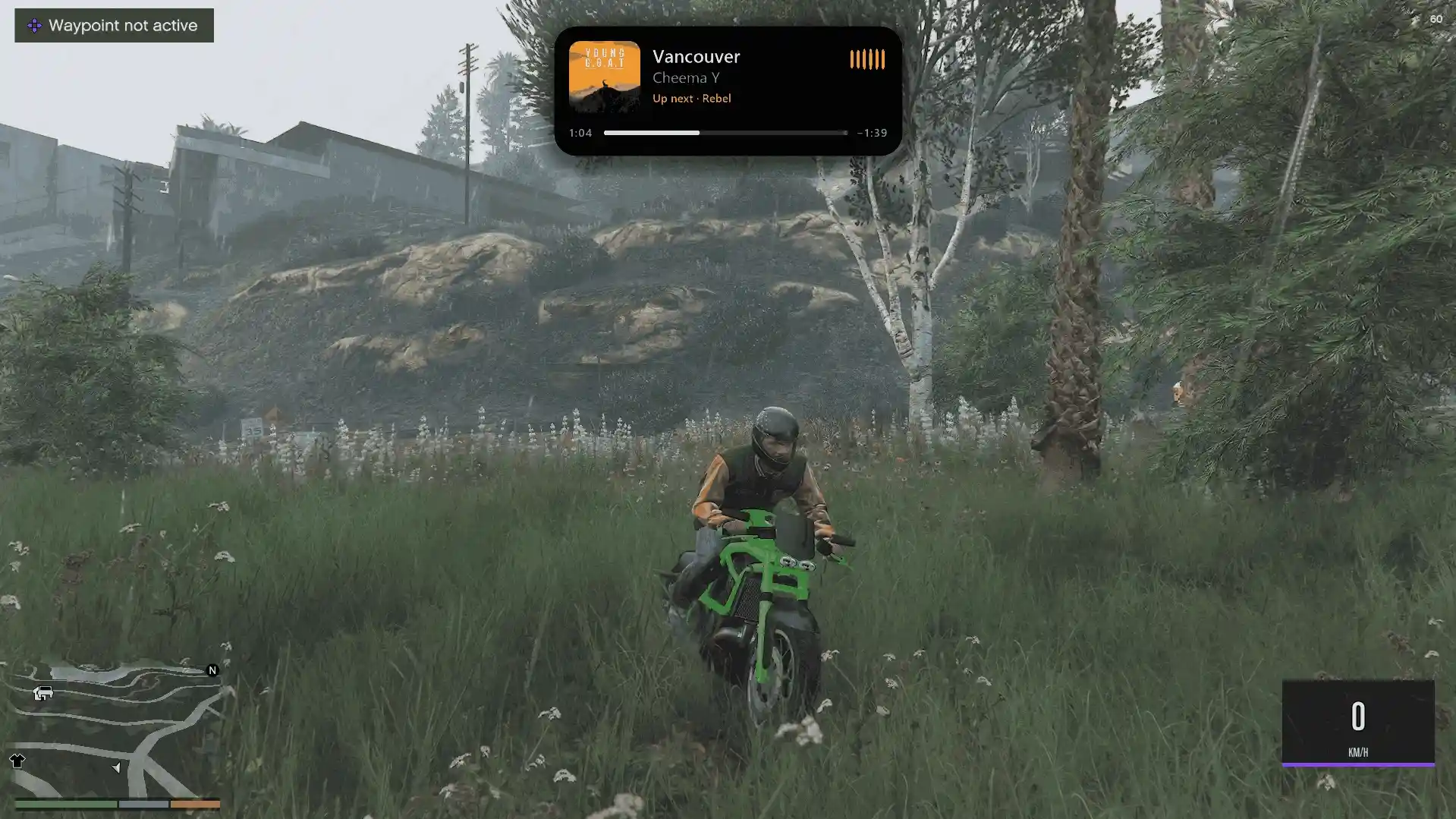
If you’re tired of the same old radio stations in GTA 5, this GTA 6 style mods pack takes your driving experience to a whole new level. Self Radio Enhanced turns your own music into a fully immersive radio station, with smart DJ transitions, AI radio hosts, realistic 3D car audio, and a modern Now Playing interface.
It works with both GTA V Enhanced and GTA V Legacy, so you can cruise through Los Santos with your own soundtrack, just like having a next-gen radio system.
Features
AutoMix – Intelligent Music Transitions: Analyses tempo, beats, intros, outros, and loudness to blend songs with beat-matched transitions, bass swaps, smooth crossfades, and echo effects.
AI Radio DJ: Natural-sounding AI hosts announce songs and react to in-game time, weather, location, vehicles, driving speed, police pursuits, and your current character.
Radio Host Conversations: Two hosts can talk to each other, listeners can call in with requests, and custom DJ clips are supported.
Optional Offline Neural Voice Pack: Adds realistic AI radio announcements without needing an internet connection.
Smart Shuffle: Adapts music selection to gameplay, favouring high-energy tracks during fast driving or police pursuits and calmer music during relaxed nighttime cruises.
Advanced Audio Equaliser: Includes Bass Boost, Club, Vocal, Night Drive, and Car Hi-Fi presets, plus automatic loudness matching.
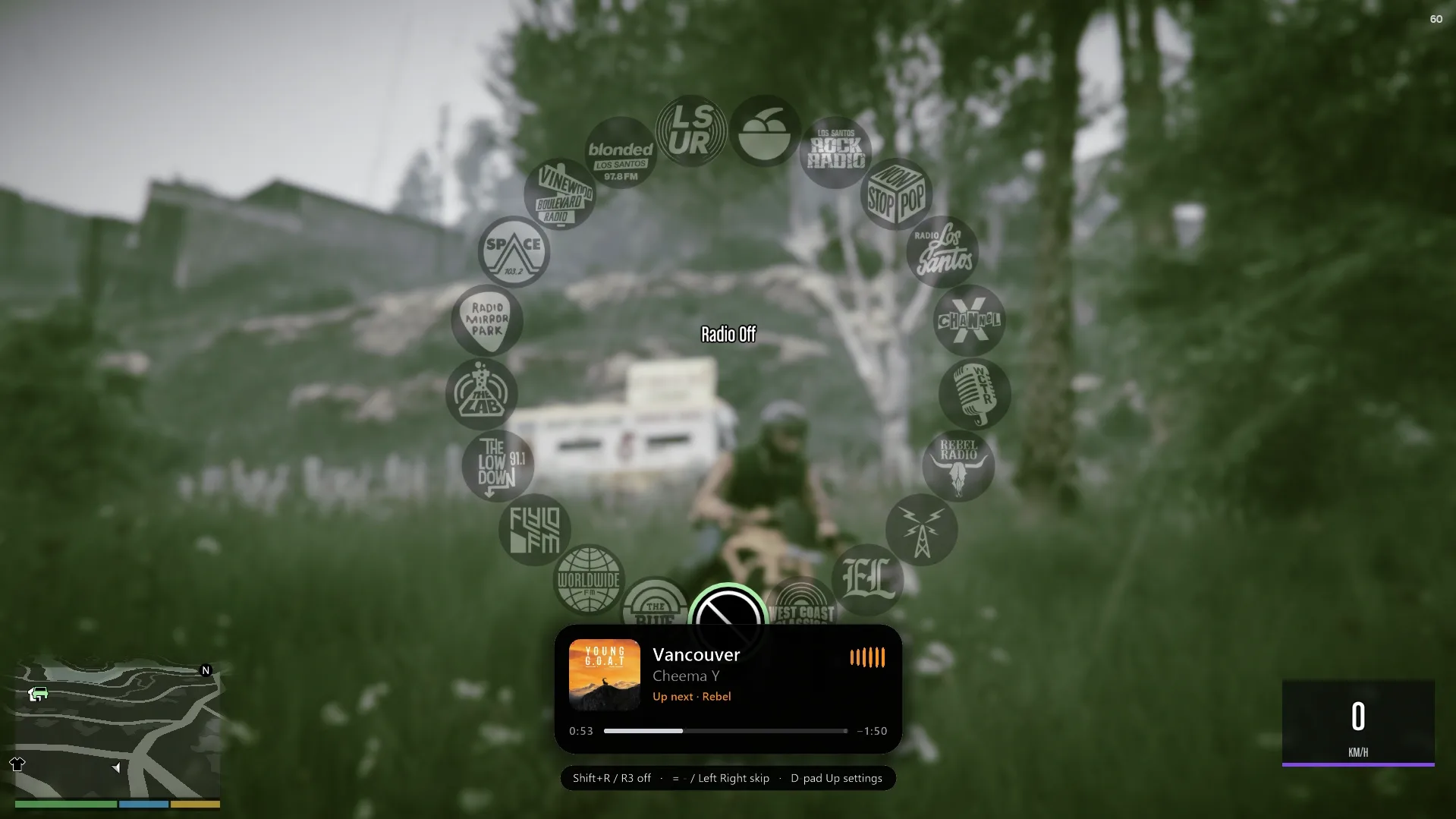
Modern Now Playing Card: Features rounded album artwork, a live waveform, song progress, upcoming tracks, smooth animations, and customisable themes.
Character-Based Colours: Michael gets blue, Franklin gets green, and Trevor gets orange interface themes.
Self Radio Artwork: Songs without album covers display a handwritten Self Radio design.
Realistic 3D Car Audio: Music continues playing inside your vehicle after you exit, becoming muffled and changing direction depending on your position, then fading with distance.
Vehicle Engine Control: Manually toggle your vehicle engine, with GTA IV-inspired behaviour when exiting a vehicle.
Authentic GTA Radio Integration: Includes radio tuning static, remembers your Self Radio selection, muffles audio in the pause menu, and reduces music volume during phone calls and mission dialogue.
In-Game Settings Menu: Customise audio, AutoMix, DJ voices, equaliser presets, visual themes, card position, and keyboard shortcuts.
GTA V Enhanced and Legacy Support: Version 2.1 introduced Legacy support, allowing the original Self Radio selection to play Self Radio Enhanced on that edition.
Crash Protection: Version 2.1 added protection that switches the mod off and displays a notification if an error occurs, instead of closing the game.
Version 2.2 Improvements: Fixes a DirectX texture creation crash, improves album artwork loading, adds a Classic card style without images, fixes a Neural Voice Pack installer issue, and prevents unwanted shutdowns when the game or another mod activates the car radio.
Requirements & Installation
Requirements:
GTA V Enhanced or GTA V Legacy for PC.
Latest compatible Script Hook V.
ASI Loader.
Story Mode only.
BattlEye disabled for Story Mode. The installer can offer to handle this.
Script Hook V .NET is not required.
Script Hook V and ASI Loader: https://www.dev-c.com/
Method 1: Automatic Installation
Download Self Radio Enhanced from the mod page.
Run the included setup application.
Let the installer detect your GTA V Enhanced or Legacy installation.
Follow the prompts to check Script Hook V and BattlEye.
Choose whether to download the optional Neural Voice Pack.
Complete the installation using the on-screen instructions.
Method 2: Manual Installation
Open the
Manual Installfolder from the downloaded archive.Copy
SelfRadio.asiinto your GTA V installation directory, alongside the main game executable.Make sure Script Hook V and ASI Loader are installed correctly.
Launch GTA V in Story Mode.
Adding Your Own Music
Open your Documents folder.
Navigate to
Rockstar GamesGTA VUser Music.Copy your favourite music files into the
User Musicfolder.Launch GTA V and enter a vehicle.
Press Shift + R to activate Self Radio.
Updating from Version 2.0
Run the new setup application or replace your existing
SelfRadio.asiwith the updated version.Your settings, favourites, and music should be preserved.
Remember that the settings shortcut is now Ctrl + K.
Controls
All controls can be customised in the settings menu.
Shift + R: Toggle Self Radio.
Equals key (=): Next song.
Minus key (-): Previous song.
Ctrl + K: Open the settings menu.
Shift + L: Favourite the current song.
Shift + F: Toggle the vehicle engine.
Controller: Hold the radio wheel and use R3 or the directional pad.
Changelog
Version 2.2
Fixed a crash involving DirectX PNG texture creation.
Moved card images to a safer folder and added checks before loading.
Added a Classic Now Playing card style without images.
Fixed the
bzip2installer error when downloading the Neural Voice Pack.Fixed unwanted Self Radio shutdowns when the game or another mod turns the car radio on.
Version 2.1
Added GTA V Legacy support.
Redesigned the Now Playing card with rounded artwork, animated colour-matched waveforms, and smoother transitions.
Added album artwork fading during AutoMix and handwritten artwork for tracks without covers.
Redesigned the settings menu and radio wheel card.
Added conversations between two hosts and listener phone calls.
Improved FM radio voice processing and timed DJ speech to finish as the next song’s vocals begin.
Changed the settings shortcut to Ctrl + K.
Added crash protection and fixed an album-art-related crash.
Improved installer detection for Legacy installations and BattlEye.
Version 2.0
Introduced intelligent AutoMix.
Added optional offline neural AI radio voices.
Added the in-game settings menu and audio equaliser presets.
Introduced character-based colour themes and the redesigned Now Playing interface.
Added vehicle engine controls and GTA IV-inspired vehicle exit behaviour.
Introduced the automatic installer and improved radio audio functionality.
Version 1.0
Initial release.
Credits
Utkarsh Thakur: Mod development, programming, and radio DJ writing.
Alexander Blade: Script Hook V.
hexgrad: Kokoro 82M voice model, licensed under Apache 2.0.
k2-fsa: sherpa-onnx, licensed under Apache 2.0.
Final Thoughts
Self Radio Enhanced is more than just a way to play your own music. With intelligent mixing, AI radio hosts, realistic vehicle audio, customisable controls, and a slick music player, it makes every drive through Los Santos feel like your own personal radio show.
Version 2.2 also brings useful stability fixes and a clean Classic card option. Whether you’re cruising around the city, speeding down the highway, or getting chased by the cops, your soundtrack can match the moment.
Developer: UTKXSH
Images by: UTKXSH, YOUTUBEJho0nBR, GTA Community

This content has no age restrictions.
Share a YouTube video related to this content.
No videos have been added yet.
If you found this useful, you can support the creator.
This creator is not accepting donations.